
ROL Download for WindowsDownload
RustOxyLauncher
> Rust server launcher for Windows

A Rust server that survives patch day without you.

Installs the game, Oxide and plugin updates at night, rolls back what failed to compile, restarts a crashed server and tells you on Telegram. All in one panel.

Windows 10 / 11 · Oxide and Carbon · free tier with no time limit
patch day · server 01
03:00:12 [patch] Steam: new game build is out
03:00:13 [patch] players: “restart in 5 minutes”
03:05:14 [01] server stopped
03:06:40 [steam] game updated
03:07:02 [oxide] build for the new version is out — installing
03:07:31 [plugins] 6 updated, 1 failed to compile → rolled back
03:08:55 [01] Server startup complete
03:08:56 [telegram] “Patch applied, server is up”
>

What ROL does

Not a panel wrapped around RCON — a core that watches the server by itself. You set the rules, it follows them and reports back.

01 / patch day

Game, Oxide, plugins

Watches Steam and uMod, installs everything on a stopped server in the night window. The game downloads into a staging copy — the server goes down only when files are already on disk.

02 / rollback

Failed to compile — reverted

A plugin didn’t load after an update? The previous version comes back, the broken one goes to quarantine, and you get a report instead of an empty server in the morning.

03 / watchdog

Brings a crashed server back

Crashed — restarted. Stopped by you — left alone. Every action in the audit log: who, when, from where.

04 / telegram

Bot with buttons and Mini App

Alerts, start and stop from chat, the panel on your phone. Buttons instead of commands. Works through our relay even where Telegram is blocked.

05 / fleet

Several machines

Servers from different computers in one list. A second machine joins with a code in a minute.

06 / AI

Crash analysis and !ask

A summary from the logs after a failure, answers to players in chat. A local model on your GPU or a cloud API — your choice.

How it looks

Three steps from the archive to a live server. No console.

01

Install

Unzip, run the wizard: language, servers folder, steamcmd downloads itself. One UAC prompt — and the service is in place.

02

Add a server

Name, ports (busy ones get highlighted), map and seed. The RCON password is generated for you. Preflight shows what else to fix.

03

Connect Telegram

Bot token, “Send test” button — and the first message is already on your phone. From here the server runs itself.
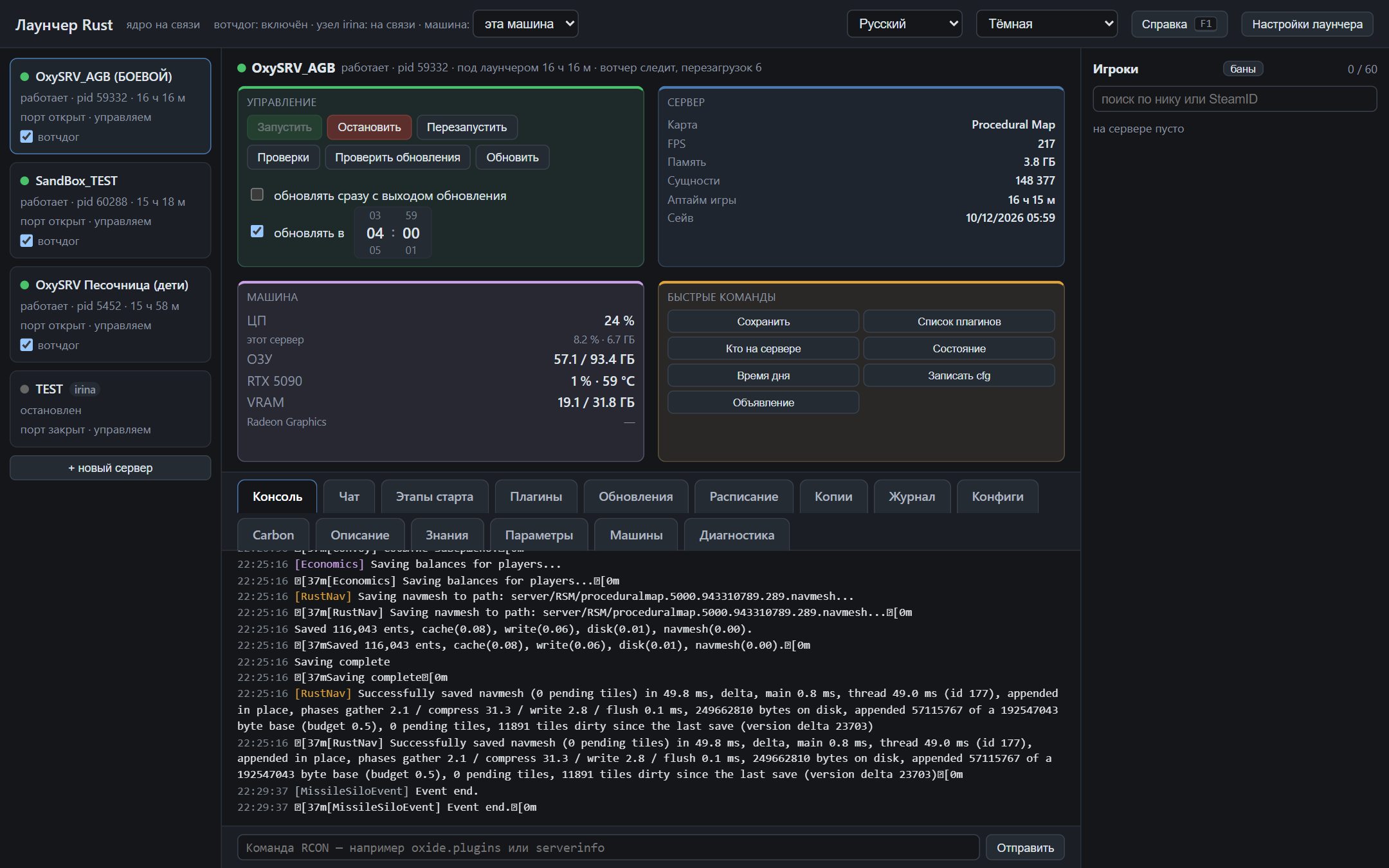
ROL panel — server overview
Telegram bot and Mini App

Pricing

The free tier has no time limit. Paid tiers are for when you have more than one server or machine and life without the bot hurts.

Free
Free
  • 1 server on 1 machine
  • Panel, start and stop
  • Game, Oxide and plugin updates with rollback
  • Watchdog, backups, audit log
  • FAQ and help inside the panel
  • Telegram bot and Mini App
  • Carbon as an alternative to Oxide
  • AI summaries and !ask
Get it free
Pro
€25 one-time
  • Up to 3 servers, 1 machine
  • Everything in Free
  • Telegram bot with buttons (direct or via your proxy)
  • AI: crash summaries, !ask, config explanations
  • Scheduled night patch day
  • Telegram relay and Mini App through our server
Buy
Max
€7 per month
  • Unlimited servers and machines
  • Everything in Pro
  • Telegram relay and Mini App through our server — no public IP or VPN needed
  • Priority support, fast replies
  • Remote fix on request
  • Early update channel
Buy

Pro is a one-time purchase with free updates within the major version. Max is a subscription because the relay and support cost us money every month.
Questions

SmartScreen warns on launch — is it a virus?
No. The build isn’t code-signed yet, so Windows shows “unknown publisher”. Click “More info → Run anyway”. Signing arrives with the first paid release.
Do I need a public IP?
For the Rust server itself — yes, as always: players must reach it. For the panel and bot — no: the panel is local, the bot talks to Telegram on its own. The Mini App on your phone works without a public IP through our relay (Max tier).
My ISP blocks Telegram.
The bot can go through your proxy (SOCKS5/HTTP) or through our public Bot API relay, included in Max. Switching is automatic: if api.telegram.org times out, the core moves to the mirror.
What happens to the server if the launcher crashes?
Nothing. The server is a separate process and doesn’t depend on the core. The core runs as a Windows service and restarts itself; after coming back it attaches to the already running server instead of restarting it.
A plugin update broke the server.
The core sees it over RCON (plugin not loaded), restores the previous version from backup and quarantines the update. You get an alert with buttons “Keep the old one” / “Try again”.
How is it different from RSM?
ROL is built around uptime: night updates through a staging copy, plugin rollback, a watchdog that respects a manual stop, Telegram with buttons, and it works from Russia without workarounds. And there is a free tier.

All questions →